
There’s an undeniable joy in revisiting beloved recipes and giving them a fresh visual narrative. For food bloggers and home cooks alike, the presentation of a dish is just as crucial as its taste. Today, I’m thrilled to share my latest insights and refreshed Food Photography Tips, using my classic Breakfast Egg Bake Casserole as a prime example of how much a little dedication can transform your culinary creations.


The striking difference: The photo on the left was captured last year with an iPhone, while the photo on the right was taken just a few weeks ago using a Canon Rebel T3 DSLR Camera. The evolution is clear.
The Journey from Snapshot to Stunning: My Early Food Photography Struggles
When I first ventured into the world of blogging, my approach to photography was, to put it mildly, quite rudimentary. While I understood the basic need for images, I certainly didn’t grasp the profound impact that exceptional food photography could have on engaging my audience and truly showcasing the deliciousness of my recipes. My primary tool was my iPhone camera – and while modern iPhones are capable of producing remarkable images, mine often fell short due to a crucial lack of understanding on my part.
I operated under the misconception that any light source would suffice, completely unaware of the transformative power of natural light. This oversight resulted in many of my early food photos appearing dull, unflattering, and frankly, unappetizing. They lacked vibrancy, depth, and the inviting warmth that makes a dish truly irresistible. The images below, representing my initial attempts at capturing my Breakfast Egg Bake Casserole recipe, serve as a stark reminder of those early, unrefined pre-DSLR shots.

Pre-DSLR: Would you call this appetizing? My early sarcasm now translates into a genuine lesson learned about visual appeal.

A candid look back at my early photography: “What the heck is that? Is that even edible?” These questions accurately reflected the quality of my initial efforts.
Unveiling the Secrets: My Path to Improved Food Photography
Looking back at those images, it’s clear I was making numerous critical errors. My compositions were haphazard, lacking any thought or artistic direction. I neglected the cardinal rule of natural light, often shooting in poorly lit indoor environments or under harsh artificial lights that created unflattering shadows and color casts. I frequently got too close to the food, losing important context, or too far away, making the dish seem insignificant. Furthermore, I wasn’t investing any time in editing my photos, believing that what came out of the camera was the final product. I failed to plan my shots, experiment with angles, or consider props and backgrounds.
My blogging journey soon led me to a pivotal realization: if I wanted my recipes to truly shine and captivate readers, I needed to elevate my photography. This “aha!” moment prompted me to dive deep into the world of food photography research. I devoured articles, watched tutorials, and learned from seasoned professionals. It was an incredible eye-opener to discover the many techniques I was overlooking. The simple act of understanding fundamental photography principles – combined with the investment in a good camera – proved to be an absolute game-changer.
The Transformation in Action and Why It Matters

A clear choice: Would you prefer to enjoy this beautifully presented dish or the unappealing food shown in the earlier “before” photos?
You might be wondering about the specific steps I took to achieve a photo like the one above. It’s a testament to applying foundational food photography principles. This particular shot was taken around 9 AM, positioned inside my front living room, right beside a large window. Crucially, the light was unfiltered, allowing the soft, natural morning glow to illuminate the scene perfectly. I shot in manual mode on my DSLR, granting me full control over the exposure, though I opted for automatic white balance for convenience and accuracy.
Essential Camera Settings for This Food Photography Shot:
Understanding and controlling your camera’s settings is paramount for achieving professional-looking food photos. Here’s a breakdown of the settings I used for this delicious Breakfast Egg Bake Casserole image, and why they were chosen:
- Shutter Speed: 1/60th of a second – This speed is generally sufficient for still-life subjects like food. It’s fast enough to prevent motion blur (from minor camera shake, especially when hand-holding) while still allowing ample light into the sensor.
- Aperture (F-stop): f/2.5 – This wide aperture creates a shallow depth of field, meaning only a specific part of the image (the casserole in focus) is sharp, while the background and foreground are beautifully blurred. This technique, often called “bokeh,” helps the subject truly stand out and gives the photo a professional, artistic feel. For food, a shallow depth of field can isolate key ingredients or textures, drawing the viewer’s eye precisely where you want it.
- ISO: 100 – ISO measures your camera’s sensitivity to light. An ISO of 100 is the lowest setting on most cameras and produces the cleanest image with the least “noise” or grain. Since I was shooting in abundant natural light, I didn’t need to increase the ISO, ensuring maximum image quality.
- No Flash – Direct flash can be incredibly harsh and unflattering for food, creating stark shadows and washing out colors. Natural light, as utilized here, is almost always the superior choice for food photography.
- RAW Format – Shooting in RAW mode captures all the data from your camera’s sensor, providing maximum flexibility during post-processing. Unlike JPEGs, which compress and process image data in-camera, RAW files allow for much greater control over exposure, white balance, and color corrections without degrading image quality. This is a critical step for serious food photographers.
My Food Photo Editing Workflow: Enhancing Your Images
Even with perfect camera settings, post-processing is an indispensable step in bringing out the best in your food photography. I leveraged a combination of Photoshop Elements and PicMonkey to refine this particular image. This two-tool approach, while perhaps unconventional for some, highlights my ongoing learning journey and the accessibility of various editing platforms.
In Photoshop Elements:
- RAW Image Editor Adjustments: My first step was to open the RAW file in Elements’ dedicated RAW editor. I initially applied the auto-adjust settings, which often provide a good starting point. However, I then manually adjusted the exposure with the slider, as the auto-adjustment made the photo a little too bright for my preference. This fine-tuning is crucial for achieving the desired mood and clarity.
- Color Cast Removal and Lighting Levels: After opening the photo fully in Elements, I focused on color correction. Removing any subtle color casts ensures that the food’s true colors are accurately represented. I also used the auto-adjust feature for lighting levels, which helps to balance the highlights, mid-tones, and shadows, making the image pop.
- Saving as JPEG: Once satisfied with the foundational edits, I saved the photo as a high-quality JPEG file, which is a standard format for web use due to its balance of image quality and file size.
In PicMonkey:
- Resizing and Cropping: The first action in PicMonkey was to resize and crop the image to 600×750 pixels. Proper cropping is essential for composition, helping to frame the subject effectively and remove any distracting elements from the edges of the shot. Resizing ensures the image is optimized for web display, balancing visual quality with fast loading times.
- Sharpening with Unsharp Mask: I then applied the Unsharp Mask tool, setting the radius to 3.2. Sharpening helps to define edges and bring out texture, making the food look crisp and inviting. I experimented with the strength and clarity sliders until I achieved the perfect level of sharpness without creating an unnatural, over-processed look.
- Subtle Lighting Adjustments with Curves Tool: Finally, I utilized the Curves Tool for a slight, final adjustment to the lighting. The Curves tool offers precise control over tonal range, allowing you to subtly brighten or darken specific parts of the image, enhancing contrast and overall appeal.
I readily acknowledge that many of these advanced editing functions performed in PicMonkey can also be accomplished within Photoshop Elements. As a relatively new user to Elements, I’m still exploring its full capabilities. My plan is to dedicate more time to mastering Elements in the future, streamlining my workflow and harnessing its comprehensive features. The key takeaway, however, is that powerful editing tools are accessible, and continuous learning is part of the growth process for any photographer.
Another Example of Enhanced Food Photography
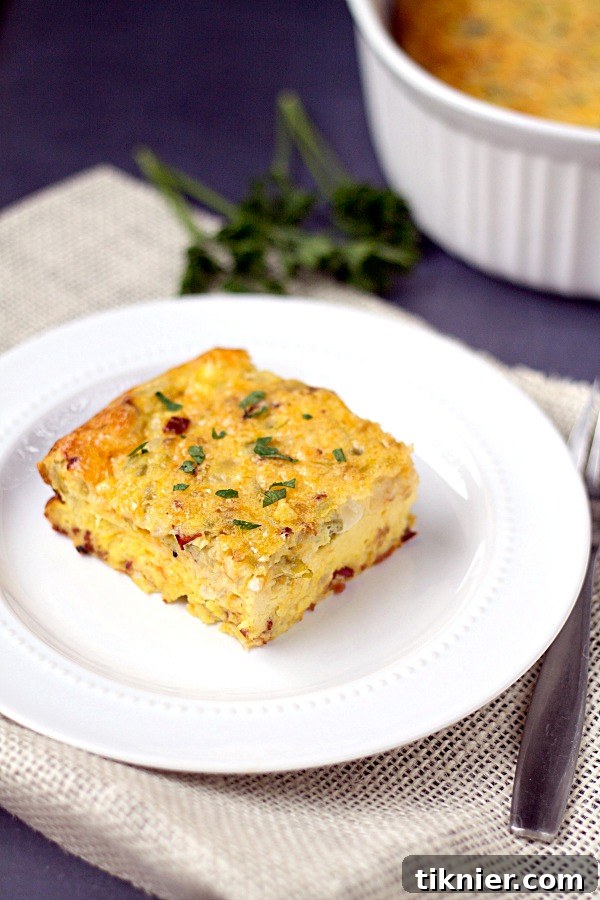
The techniques and settings detailed above were consistently applied to achieve the improved visuals across my portfolio. For the photograph below, the camera settings remained identical to those previously listed, ensuring consistency in exposure and depth of field. The only variation was resizing the image to 600×900 pixels, which demonstrates how versatile these core principles are for various aspect ratios and compositions.
Ready to Cook and Capture Your Own Masterpiece?
Mastering food photography is an ongoing journey of learning and experimentation. By embracing natural light, understanding your camera’s manual settings, and utilizing effective post-processing techniques, you can dramatically elevate the visual appeal of your dishes and captivate your audience.
Inspired to recreate this delightful breakfast? Of course you are! You can find the complete recipe for this mouth-watering Breakfast Egg Bake Casserole here.
If you’re interested in exploring more of my photography makeovers and valuable insights for bloggers, be sure to visit my comprehensive Blogging Tips archive. Happy cooking and happy shooting!